Table of Contents
As AI becomes more common, a lot of things have gotten easier, especially when it comes to generating design ideas and images.
As a promotional product manufacturer, we receive inquiries every day for custom coins, keychains, pins, and other products. More and more often, the artwork customers send us is a beautiful AI-generated image.
But there’s one thing to keep in mind: just because an AI image looks great doesn’t mean the final product can be made exactly the same way.
1. An AI Design Is Not the Same as Production-Ready Artwork
There’s nothing wrong with using AI to explore design ideas. It’s great for trying different themes, layouts, and color combinations, and it also helps us understand what kind of look you’re going for.
But when it’s time to actually make the product, a finished-looking AI image usually isn’t ready for production.
Most AI tools generate JPG or PNG files. Even if you place that image inside an .AI, EPS, SVG, or PDF file, it doesn’t automatically become true vector artwork. We still can’t separately edit the text, lines, colors, or outlines inside the image.
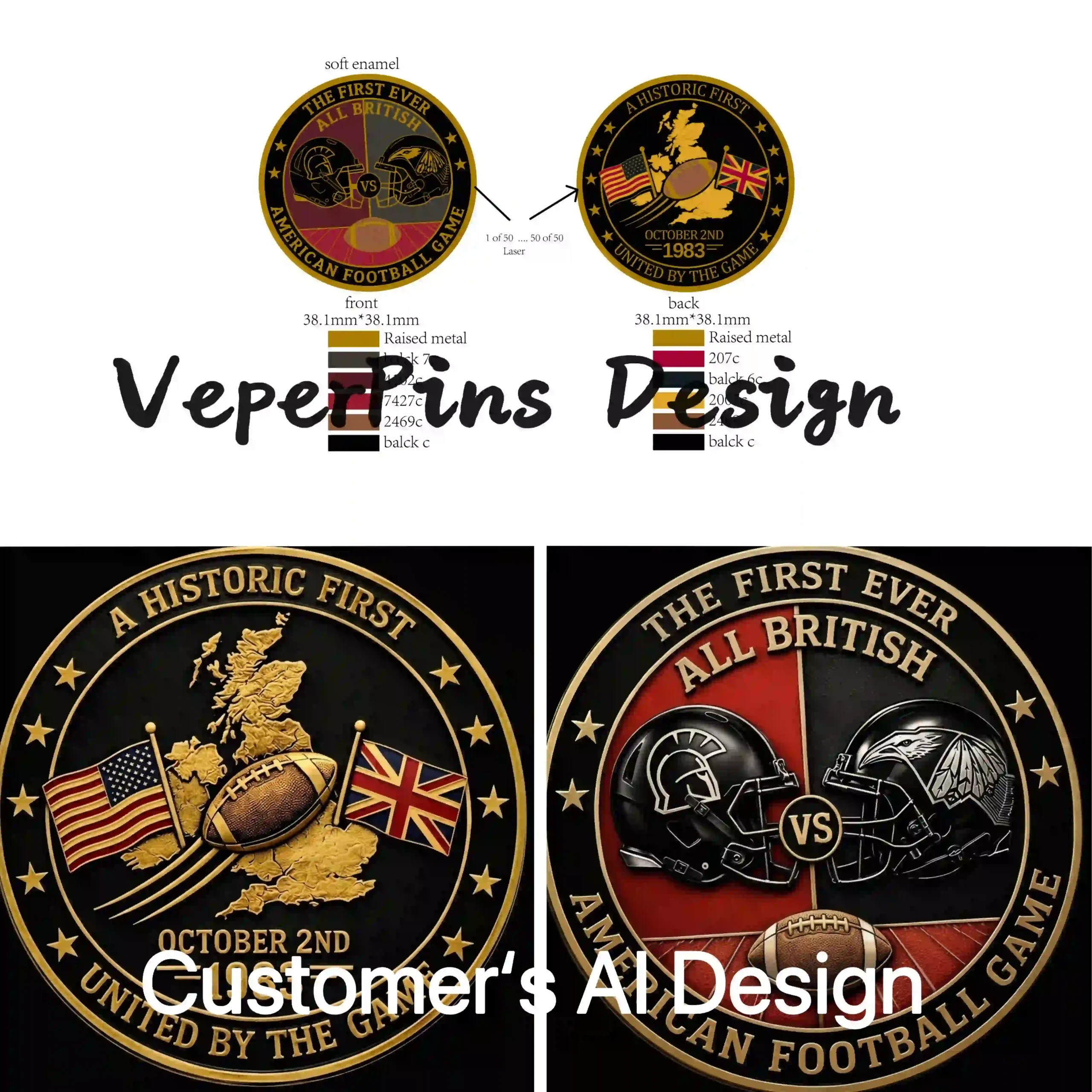
We’ve seen this with challenge coin designs before. A customer used AI to generate the front and back separately. Both sides looked great on their own, but the outer shapes didn’t match.
A real coin only has one shape, so the front and back have to use the same outline. Before production, that kind of design still needs to be adjusted.
That’s why we see AI images more as a way to show us what you want, rather than instructions telling the factory exactly how to make it.
Once we receive the design, we still need to review it based on the actual product size and manufacturing process, then decide which details can stay and which ones need to be changed.
2. Decide on the Product, Size, and Process First
Before asking AI to start drawing, decide what you’re actually making.
The product and its size will directly affect how much detail the design can realistically hold.
Pins, challenge coins, and medals:
With enamel, different color areas usually need to be separated by metal lines. Gradients, shadows, and photo-like effects are generally better handled with printing.
Embroidered patches:
Very small text, thin lines, and subtle shadows are difficult to reproduce with thread, so these details usually need to be simplified.
Woven patches:
If your design has small text or finer lines, woven patches are often a better choice than embroidery. If you need gradients or photo-like details, printed patches may work better.
Acrylic keychains:
Acrylic can keep a lot of small design details, but you still need to think about the cut shape, where the attachment hole will go, and which areas should be transparent.
PVC keychains:
The design needs to be separated into solid color areas and raised or recessed layers. Very fine textures, soft shadows, and lighting effects usually can’t be reproduced directly.
3. Your AI Prompt Should Match the Production Process
Once you know what you’re making, the prompt should match the actual manufacturing method.
You can’t use the same prompt for an embroidered patch and a enamel pin and simply swap out the product name. The two processes handle lines, colors, and small details very differently.
A useful prompt structure is:
Product and size + design subject + production process + color and line requirements + front-facing artwork + no lifestyle scene or product mockup
Depending on the product, you can add instructions like these:
- Hard enamel: solid enamel colors, continuous metal lines separating every color, smooth flat surface, no gradients
- Soft enamel: raised metal borders, recessed enamel areas, solid colors, visible metal details
- Die struck: raised and recessed metal only, no enamel colors, antique metal finish, clear relief
- Embroidered patch: bold shapes, thick lines, large readable text, limited thread colors, no gradients
- Woven patch: clean flat design, fine but clear lines, readable small text, no photo texture
- Acrylic keychain: full-color printed artwork, clean cut outline, transparent background, clear space for the attachment hole
- PVC: solid color sections, clear raised and recessed layers, no glow or soft shadows
- 3D relief: front-facing relief design, clearly defined raised and recessed areas, no lighting effects used as depth
For example, if you want to create a 1.5-inch hard enamel pin, you could use a prompt like this:
Front-facing flat artwork for a 1.5-inch hard enamel pin featuring a lighthouse and ocean waves. Use five solid colors, with every color area separated by continuous gold metal lines. Use bold, clean outlines. No gradients, shadows, text, product mockup or background scene.
That gives AI much more useful direction than simply typing “enamel badge.”
Even then, the generated image should still be treated as a design reference. Before production, the artwork still needs to be prepared around the real manufacturing process.
4. Check the Small Details and Copyright
AI-generated artwork can look finished at first glance, but small mistakes are easy to miss.
Take a police badge, for example. One design might include a department name, job title, county, state, and a center seal, with several lines of text following different circular paths.

AI can easily leave out a word, repeat letters, change the spelling, or get the spacing and text direction wrong. The overall design may look fine until you zoom in and realize it can’t be used as-is.
That’s why it’s a good idea to send the exact wording separately instead of relying only on the text shown in the AI image. Everything should be checked again before production.
Color is another thing to watch.
RGB colors on a screen can look different from real enamel, embroidery thread, or printed colors. If an exact color matters, it’s better to provide a Pantone color.
And if your design includes a sports team logo, movie or TV character, brand logo, or someone’s portrait, make sure you have permission to use it.
The U.S. Copyright Office has noted that, with current generative AI technology, prompts alone generally do not provide enough human control to establish authorship. However, creative human selection, arrangement, or modification of AI-generated material may still qualify for copyright protection.
Conclusion
AI can definitely save time, especially when you’re looking for ideas, testing different elements, or trying out different layouts.
But at this stage, before a design goes into production, it still usually needs to be reviewed and prepared by a manufacturer’s designer based on the actual production process.
If your design has a lot of elements, AI can be useful for creating a rough visual direction. But whether the final product can actually be made to look exactly like the AI image is something you should confirm with the supplier.
If your design is fairly simple, you may not need AI at all. You can send us your logo, text, images, or reference materials directly, and we can create the vector artwork around the real production requirements. In many cases, that ends up being more accurate and saves time on revisions later.
At VeperPins, we have more than 30 designers who can help with custom coin, pin, and medal artwork. If you’re planning something for an event, team, or brand, feel free to contact us.